
Viber handles a desktop sign-out differently from a phone account deactivation. To disconnect one computer, deactivate its Viber Desktop session. Removing Viber from a phone or clearing its storage does not guarantee a sign-out, and deactivating the phone account affects more than one device. Check your chat backup before deleting app data or closing the account.
Choose the action that matches your goal
“Log out” may mean ending a session on one computer, removing the app from a phone, or deactivating the Viber account. These actions have different effects. Viber gives separate instructions for desktop deactivation and phone deactivation.
| Your goal | What to do | Scope | Before you proceed |
|---|---|---|---|
| Stop using Viber on one computer | Deactivate Viber Desktop on that computer, or remove it through your phone’s linked-device controls if available | One computer | Desktop app data may be removed; your phone account can remain active |
| Take a break from Viber on your phone | Close the app, or remove it if you no longer need it installed | App on that phone | Removing the app may affect local chat data; check your backup |
| Sell, give away, or reset your phone | Back up anything you need, then follow the appropriate device or account procedure | Could affect the account and linked devices | Read Viber’s warning before deactivating the account |
| Stop using Viber altogether | Deactivate the account in Viber settings | The whole account | Treat this as a destructive action, not a routine sign-out |
The Android operating system) has app storage controls, but clearing storage is not the same as using a Viber sign-out command.
Viber logout on Android
Viber mobile may not show a standard sign-out control. If you only want to disconnect a computer, leave your Android app’s storage and phone account alone. Remove the computer through a linked-device control, if one appears, or deactivate Viber Desktop directly.
Look for a linked-device control
- Open Viber on your Android phone.
- Tap More, then Settings.
- Under Account, look for a device or desktop section. The wording may vary by app release.
- If the computer appears, select it and choose the available deactivate or disconnect command. Read the confirmation before you continue.
No linked-device control? Use Viber Desktop’s deactivation steps below. Closing the app or clearing its cache does not confirm that you have signed out.
Before clearing storage or uninstalling
Android settings let you clear app storage or uninstall an app, but those actions are not a documented substitute for Viber logout. Clearing storage can erase local app data and may mean you need to activate Viber again. It does not guarantee that your chats can be restored.
Before removing or resetting Viber, back up your Viber chat history. Check the backup date in Viber’s settings and make sure you can access the Google Drive account used for the backup. An old backup, or one linked to another account, may not restore the messages you need.
Log out Viber iPhone or iPad
Apple’s iPhone user guide says Offload App removes the app while retaining its documents and data on the device. That is an iOS storage feature, not a Viber sign-out command, so it may not end the session as you expect.
Offload or delete Viber
- Open Settings on your iPhone or iPad.
- Tap General, then iPhone Storage or iPad Storage.
- Select Viber.
- Choose Offload App to remove the app while keeping its documents and data, or Delete App to remove the app and its related data from the device.
- Check Viber’s backup status and read any prompts before reinstalling.
Offloading and deleting do different things. Neither is a guaranteed way to sign out of Viber. If your goal is to disconnect a computer, remove that computer through its device controls. To stop using the phone account, read Viber’s phone deactivation guide first.
Log out Viber desktop on Windows or Mac
To log out Viber on PC Windows 10, log out Viber on PC Windows 11, or log out of Viber on Mac, deactivate the desktop session. Do not deactivate your phone account just to disconnect a computer.
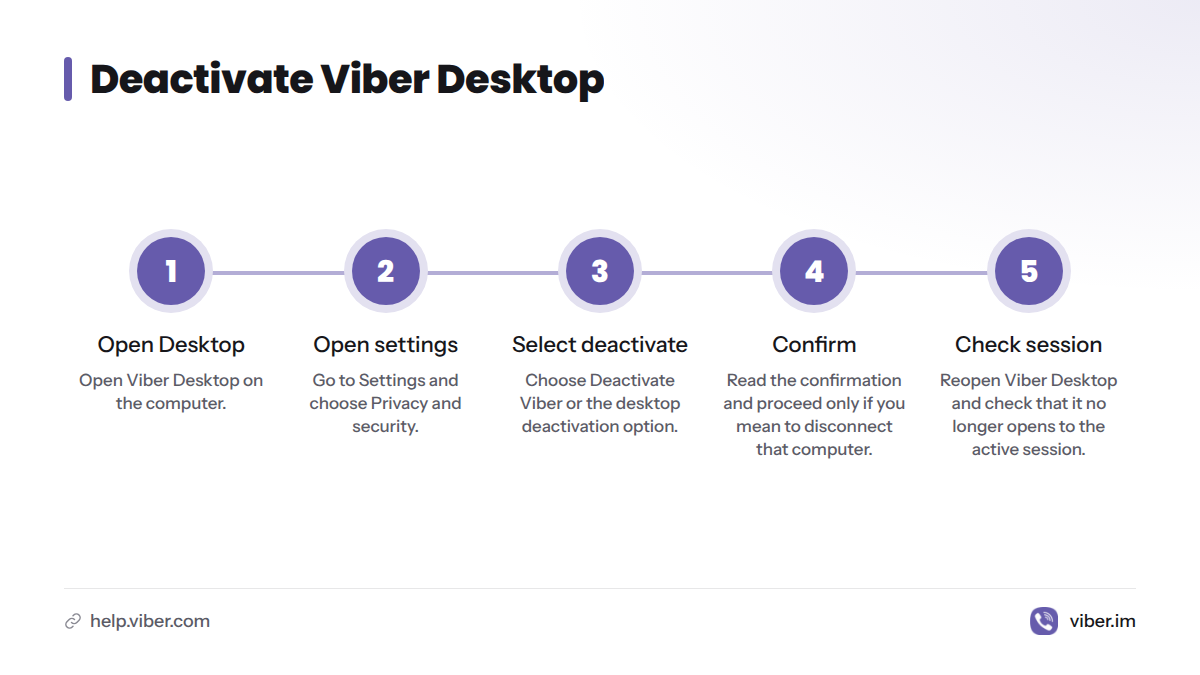
Deactivate Viber Desktop
- Open Viber Desktop on the computer.
- Open Settings and choose Privacy and security. The label may differ slightly by version.
- Select Deactivate Viber or the desktop deactivation option.
- Read the confirmation, then proceed only if you mean to disconnect that computer.
- Reopen Viber Desktop and check that it no longer opens to the active session.
Viber describes desktop deactivation separately from phone deactivation. Follow the Viber Desktop directions; its instructions and confirmation text take precedence over older screenshots or third-party tutorials.
Uninstalling Viber Desktop removes the program, but it is not the same action as deactivating the session. If you are handing the computer to someone else, deactivate the session first, then uninstall the app if you no longer need it. We recommend checking that the session has ended before passing the computer on.
How to remove Viber from another device
If you can access the device, use its Viber controls where possible. On a computer, deactivate Viber Desktop there. A linked-device list in the phone app may also let you remove a computer. Do not deactivate the whole account to close one desktop session unless Viber’s prompt requires it and you accept the account-wide effects.
If a phone or computer is lost or unavailable:
- Lost computer: Deactivate Viber Desktop on the computer if you can reach it. Otherwise, look for linked-device controls in the phone app. If neither option is available, contact Viber Support rather than assuming remote logout is available.
- Lost phone: Secure it with Apple’s Find My or Google’s device-finding tools. Contact your mobile carrier if you need to protect the phone number. If you regain the number on a replacement phone, follow Viber’s activation prompts and review its instructions before taking account-wide action.
- Phone in for repair: Back up what you need and use the phone maker’s lock or erase controls if you cannot keep the device with you. Do not assume you can uninstall Viber remotely.
Our guide to logging out of Viber on all devices offers more detail on linked sessions. Compare its steps with Viber’s help page before acting, since the controls may change.
What happens to chats, backups, and your account?
Deactivating a desktop session disconnects that computer. Removing an app affects the installation and may affect local data. Phone account deactivation is broader than either action. Before removing app data or resetting a device, check your backup and make sure you can access the account and phone number tied to Viber.
| Action | What changes | What to check first |
|---|---|---|
| Desktop deactivation | Disconnects Viber Desktop | Confirm you selected the computer session, not phone account deactivation |
| Offload on iPhone or iPad | Removes the app while iOS retains its documents and data | This does not guarantee Viber logout; check your backup before reinstalling |
| Uninstall or clear Android storage | Removes the app or its local data | Local chats may be lost; check your backup and phone-number access |
| Phone account deactivation | Deactivates the Viber account | Read Viber’s warning and check your backup; this is not limited to one computer |
Viber’s phone deactivation page describes its account deactivation flow. Deactivate, uninstall, offload, and clear cache are not interchangeable actions. Hiding online status is separate: Viber remains available on the device. See our guide to turning off Viber online status.
To sign in again after removing the app, reinstall Viber and follow the activation steps with the phone number tied to your account. Chat restoration depends on the backup you can access. Our guide to installing Viber on any device covers installation. Read about using Viber on two devices before linking another device.
Troubleshooting Viber logout problems
I cannot find a logout button
That can be normal on mobile. To disconnect a computer, deactivate Viber Desktop. On a phone, distinguish removing the app from deactivating the account. Clearing storage just to search for a sign-out control can put local data at risk.
Viber opens to the same account after reinstalling
Reinstalling does not prove that Viber deactivated your account. The app may ask you to activate with your number, and retained app data or a backup can affect what appears. If you want to close the account, use Viber’s account deactivation flow instead of reinstalling repeatedly.
I cannot access the computer or phone
Look for linked-device controls on a device you still control. If no removal option appears, contact Viber Support. For a lost phone, secure the device and the phone number. Do not rely on the assumption that deleting the app remotely signs you out.
I need to switch accounts or change my number
Viber accounts use a phone number. If you want to keep your account while changing numbers, use the in-app Change phone number process. To use another account on the same phone, review Viber’s account and activation rules first. Activating a different number is not a routine sign-out and may change which account and chat data appear on that device.
I am unsure whether my chats are backed up
Open Viber’s backup settings and check the latest backup date and destination. If there is no recent backup, do not clear app data or deactivate the account until you have read Viber’s backup instructions. A backup in an account you cannot access will not help you restore chats.
Frequently asked questions
Does Viber have a log-out button on mobile?
Viber does not provide one universal mobile sign-out control. Removing the app, clearing storage, and deactivating the account have different effects. Choose the action that matches your goal; do not deactivate the account just to disconnect a computer.
Does uninstalling Viber log me out? What about clearing cache or app data?
Uninstalling removes the app, but it does not mean the Viber account was deactivated. Clearing cache is not a reliable sign-out method. Clearing app data can remove local information and may require activation again, so check your backup first.
Can I remove Viber from another device or see where I am logged in?
Use linked-device controls in the phone app if they appear, or deactivate Viber Desktop directly on the computer. If the device is unavailable and the app shows no remote removal control, ask Viber Support. A phone account deactivation may not be necessary.
Will I lose my chats if I offload or delete Viber?
Apple says offloading on iPhone or iPad retains the app’s documents and data; deleting removes local app data. Uninstalling Viber on Android or clearing its storage can also put local data at risk. Restoration depends on the backup available to you, so check it before removing the app.
How to log in Viber or change number in Viber?
To keep your account while changing numbers, use Viber’s number-change function. To use a different number or account, follow Viber’s activation flow and read the warnings before confirming. Neither action is simply a sign-out.
Is turning off online status the same as logging out?
No. Turning off online status changes what other people can see; Viber remains available on the device.
For Viber product guidance and more app help, visit Viber.im.