
“Viber Web” is a common search term, but Rakuten Viber’s documented computer option is the Viber for Desktop app. It pairs with an active Viber account on a phone. Viber describes chats syncing between devices, but its official pages cited here do not document a browser-based messaging client. A QR code used to pair a computer does not make a browser version of Viber official.
How Viber connects a phone and desktop
Viber’s desktop download page says the desktop app syncs with a mobile account and requires an active Viber account on a phone for activation. The phone account is part of the documented setup.
Phone with an active Viber account ↔ Viber for Desktop
Viber describes chats as syncing between devices. That description does not promise a particular delivery time or identical content on every screen.
What Viber says about chat syncing
Viber’s homepage says chats sync between devices. In practical terms, the service coordinates conversations across a phone and a paired desktop, with Viber running on each device.
The public pages cited here do not explain the storage design, precise sync timing, or whether every message and media item appears identically on both devices. Treat “synced” as a description of the feature, not a guarantee of instant or complete parity.
Which computer options Viber documents
Viber’s official download page lists desktop versions for Windows, macOS, and Linux. The cited computer-access information does not list a browser client or Chrome app. That does not establish what a third-party site or extension does; it means users should not treat one as an official Viber product.
| Screen | Official option documented | Link to mobile account | What Viber’s cited pages say |
|---|---|---|---|
| Phone | Viber mobile app | The active account is used to activate desktop | Viber is available on mobile and desktop |
| Computer | Viber for Desktop | Paired with an active mobile Viber account | Downloads are listed for Windows, macOS, and Linux; check Viber’s page for available versions |
| Browser or Chrome | No browser client or Chrome app listed | No separate browser account is documented | Do not assume a web client exists because search results use “Viber Web” |
For the official computer app, visit Viber’s desktop download page. Our guide to installing Viber on a device covers device setup.
QR pairing does not mean Viber Web exists
A QR code is a visual code that a device can scan to read encoded information. Viber’s download page confirms desktop activation through a mobile account, but does not describe a browser login flow. When a QR code is used to pair a computer, it indicates phone-and-computer pairing, not proof of browser-based Viber Web access. Read more about QR codes.
QR pairing does not prove that an official browser-based Viber app exists. Check Viber’s own computer information to see which option it documents.
I would not enter a Viber phone number or account details on an unofficial page posing as a web client. For account-specific help, our Viber sign-out guide explains how to manage a session without turning this page into a login tutorial.
Chat sync is not the same as backup
“Sync” and “backup” refer to different things:
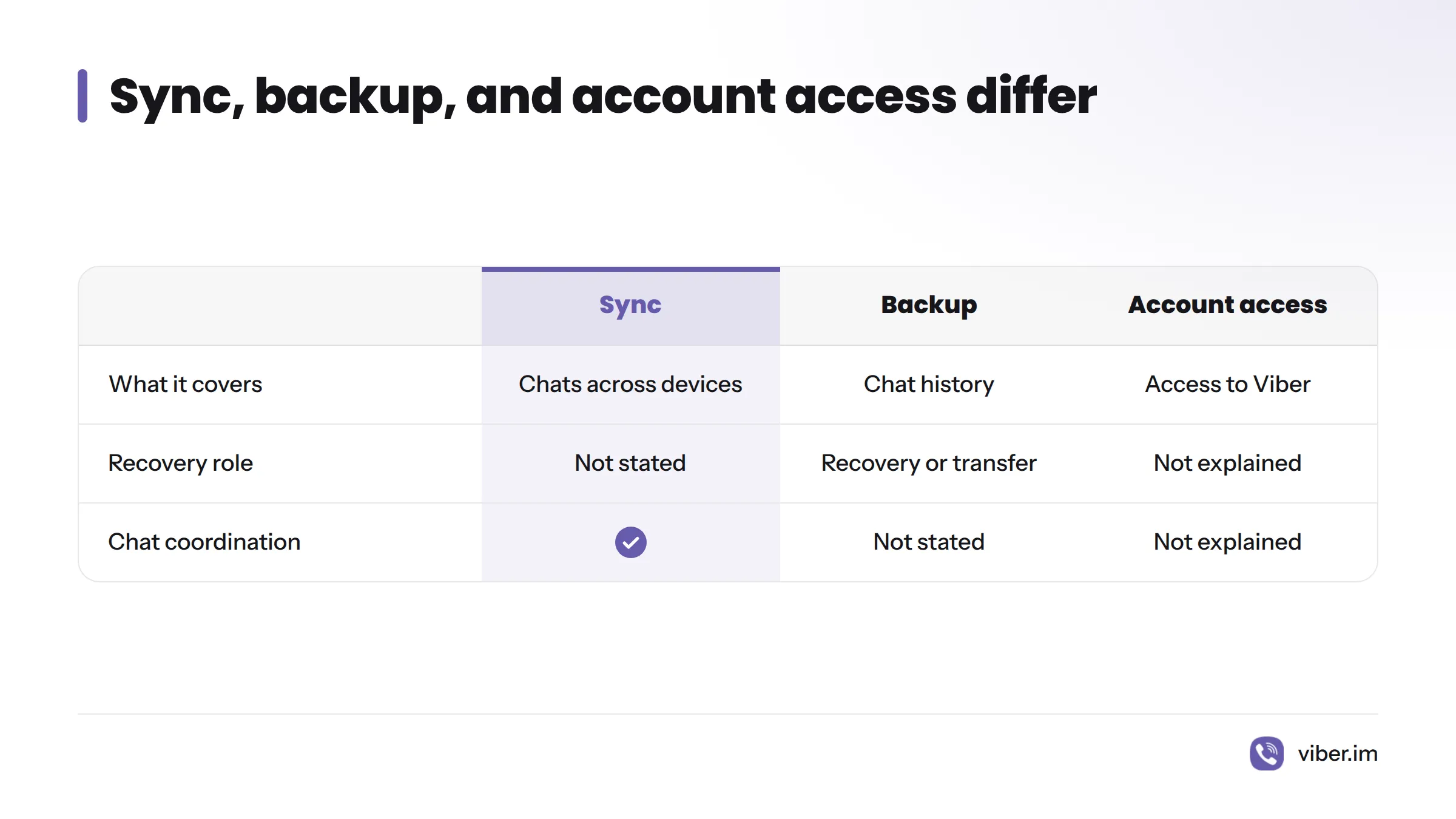
- Sync describes Viber’s stated coordination of chats between devices.
- Backup is a separate way to preserve chat history for recovery or transfer. The Viber product pages cited here do not say that cross-device sync alone creates a recoverable backup.
- Account access connects a user to Viber, but does not explain by itself what chat data gets saved or restored.
A message on one screen does not confirm that all media, older history, or call records match across devices. Viber’s public pages cited here do not explain those details or promise a set catch-up time after an internet interruption. If a device is offline or appears out of sync, do not assume messages are queued, kept for a set period, or restored automatically. Check Viber’s help information for the issue at hand.
Moving an active call between phone and desktop
Viber’s homepage describes a one-tap option for transferring a call between devices. That can help when a conversation starts on a phone and you want to continue on a computer. The cited page does not list every supported platform combination or call type, so check Viber’s product information before relying on a particular setup. Viber also offers voice and video calls; the homepage wording does not promise that every call can move in every situation.
If a device is offline or out of sync
A device needs an internet connection to communicate with Viber. The official pages cited here do not explain how offline desktop messages catch up, how long content remains available, or how to resolve every sync problem.
I would not count on a particular delivery order or recovery outcome without guidance from Viber. If the problem continues, consult the Viber Help Center before deleting data or reinstalling the app based on guesswork.
Choose the right next step
| What you need | What it means | Where to go |
|---|---|---|
| Keep conversations coordinated | Viber describes chat sync between devices | Viber desktop and mobile options |
| Preserve chat history | Backup is separate from device sync | Check Viber’s help center for backup and restore guidance |
| Set up or manage a device | Desktop activation requires an active mobile account | Viber device installation guide |
Our guide to syncing Viber across multiple devices explains how the devices relate. The Viber site has more help for using the app. This page covers the distinction between browser access and desktop pairing, not account login or installation steps.
Viber Web questions
Can I use Viber in a browser or through a Chrome app?
The official Viber computer pages cited here document Viber for Desktop, not a browser client or Chrome app. Find the desktop app through Viber’s official download page rather than assuming a browser version is available.
Can I use Viber on a computer without a phone?
Viber says desktop activation requires an active Viber account on a mobile phone. The documentation cited here does not describe a desktop account that works without a phone.
Is Viber chat sync the same as backup?
No. Viber describes chats syncing between devices, while backup is a separate matter for recovery. Sync alone does not confirm that chat history has been backed up.
Does a QR code mean Viber works in a browser?
No. A QR code can pair devices, but it does not establish that the browser is an official Viber client. The cited Viber pages direct computer users to the desktop app.
Sources
- Viber homepage, Rakuten Viber
- Viber download page, Rakuten Viber
- QR code, Wikipedia
- Viber Help Center, Rakuten Viber
Related: back up Viber chat history, Viber login and auto-login