
Install Rakuten Viber from the official app store for your phone, or download the desktop app from Viber’s official download page. Open the app after installation and follow its account setup prompts. Viber Desktop must link to an active Viber account on a mobile phone.
Choose your device below, then check its official download source for software and device requirements. The steps cover a new Viber sign up and a fresh install. Desktop setup also requires an active mobile account.
Choose an official Viber download
| Device | Official source | Check before installing |
|---|---|---|
| Android phone | Google Play or Viber’s download page | Review the app listing for Android and device requirements. |
| iPhone or iPad | Apple App Store | Check the supported devices and iOS or iPadOS requirements. |
| Windows PC or laptop | Viber’s download page | Choose a Windows file listed for your device. |
| Mac | Viber’s download page | Choose a macOS option that matches your Mac. |
| Linux computer | Viber’s download page | Review the listed Linux options, such as Ubuntu, Fedora, and AppImage, and read the page’s notes. |
App-store listings and Viber’s download page show the available files and supported systems. Those details can change, so avoid old installer links and compatibility claims from unrelated download sites. For more product information, read our Viber app overview.
Install Viber on Android
Find Rakuten Viber in Google Play
Open Google Play and search for “Rakuten Viber Messenger.” Check the app name and publisher before selecting Install. You can also start at Viber’s official download page and follow its Android link.
Avoid third-party APK sites. An APK is an Android installation file, and a file from an unknown source may not be the genuine app.
Install the app and set up your account
- Tap Install in Google Play and wait for the download to finish.
- Tap Open, or launch Viber from your app list.
- Follow the setup screens and enter the phone number you want connected to your Viber account.
- Check the number and country selection, then follow the verification instructions in the app.
- Complete the remaining prompts to open your chats.
Viber may show different ways to send or confirm a code. Follow the options on your screen rather than instructions for an older version. For more detail, see our guide to installing Viber on Android.
Keep the Android app download safe
Download Viber through Google Play or a link from Viber’s official page. Avoid repackaged APKs that promise an older version or simpler sign-in, and never share a verification code. Read each permission request and grant only the permissions you choose to use.
Install Viber on iPhone or iPad
Open the App Store listing
Open the App Store and search for “Rakuten Viber Messenger.” Check the app name and developer, or go directly to the official App Store listing. Confirm that your device and software meet the requirements shown there.
Download Viber and verify your number
- Tap Get and confirm the download if prompted.
- Open Viber when the download finishes.
- Follow the account setup prompts and enter a phone number you can access.
- Check the number and country selection, then complete the verification step shown on screen.
- Follow any remaining prompts to finish setup.
The App Store lists Viber as a free download and says Viber-to-Viber calls and messages are free. Calls to regular phone numbers through Viber Out may cost money. Check the service’s price and terms before placing a paid call.
Install Viber on a computer
Viber Desktop links to a mobile Viber account. Viber’s official download page says an active account on a mobile phone is required. Install the phone app and complete account setup first if you have not done so. Our guide to using a Viber account on two devices has more information about using your account across devices.
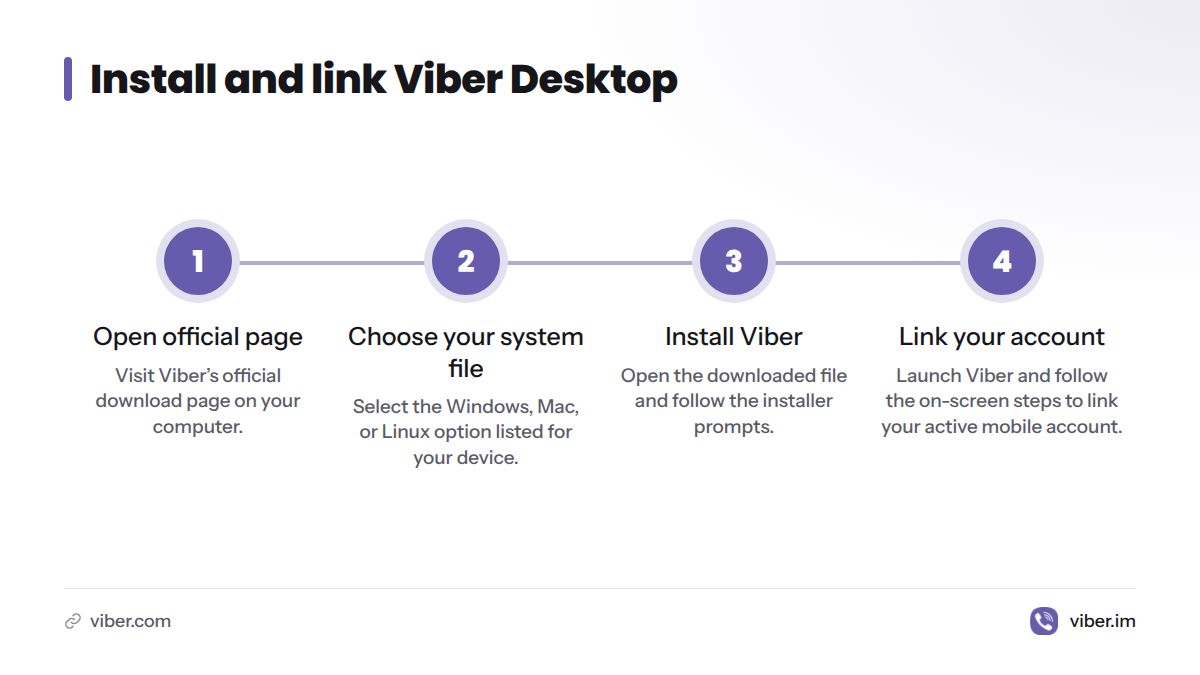
Install Viber on Windows
- Open Viber’s official download page on your PC or laptop.
- Choose a Windows file listed for your device. Check the available system options instead of assuming an older version will work.
- Open the downloaded installer and follow its prompts.
- Launch Viber and follow the linking instructions on screen.
For a step-by-step PC walkthrough, read our guide to installing Viber on Windows.
Install Viber on Mac
Open Viber’s official download page and choose the Mac option listed for your computer. Open the downloaded file and follow the installer prompts. When Viber starts, use the linking instructions it displays. If the page does not list an option for your Mac, do not use an unofficial installer to get around the mismatch.
Install Viber on Linux
Review the Linux choices on Viber’s official download page. Options may include Ubuntu, Fedora, and AppImage. Choose the package for your system and follow the instructions on the page. Package steps differ by Linux system, so avoid terminal commands copied from an unverified forum or old tutorial.
Link Viber Desktop to your phone
After installation, open Viber on your computer and follow the on-screen steps to link it with your active mobile account. The app may ask you to scan a QR code, a square pattern that a camera reads to transfer information between devices. If Viber displays one:
- Open Viber on your phone.
- Select the scanning or linking option shown in the mobile app.
- Point your phone at the desktop code and follow the confirmation prompts on both devices.
Screen labels can change. Follow the directions in the desktop and mobile apps, and do not scan a code sent by someone you do not trust. If Viber displays another linking method, use that method rather than looking for a way around account linking.
Does Viber cost anything to install or use?
Viber is free to download from its official app-store listings. Those listings describe Viber-to-Viber calls and messaging as free. Viber Out, which calls regular phone numbers, may have a charge. Prices and availability can depend on the destination and plan, so check the displayed cost before calling. Our Viber messaging and calling overview explains the difference between in-app communication and calls to phone numbers.
Check for a Viber update download
On Android, open Google Play, find Rakuten Viber Messenger, and check whether an update is available. On iPhone or iPad, find Viber in the App Store and check its update controls. Each store listing shows the app version and device requirements for that platform.
For Windows, Mac, or Linux, return to Viber’s official download page and follow the download route for your system. Available files and update steps can change. Do not use a third-party download site to resolve an update prompt.
For a Viber update download for Android, use Google Play and follow the update option shown on the app listing. If no update appears, check the listing’s compatibility details and try again later.
Fix Viber installation and activation problems
Start with simple checks before removing the app. Confirm that you used an official source, check your internet connection and available storage, and compare your device software with the requirements listed by the store or Viber download page.
| Problem | First checks | What to try next |
|---|---|---|
| Download will not start or stalls | Check your connection, available storage, and whether the app store is responding. | Close and reopen the store, then try again. Review the official listing for device requirements. |
| Installation fails | Confirm the download came from Google Play, the App Store, or Viber’s official page. Check storage and system compatibility. | Restart the device and try again from the official source. |
| Viber installs but will not open | Restart the device and check for an app or system update through an official source. | If the problem continues, check Viber’s official download page and support options. |
| Verification code does not arrive | Check the phone number and country selection. Make sure your phone can receive the method shown in the app. | Wait before requesting another code, then use the in-app options. Never share the code. |
| Desktop will not link | Confirm Viber is active on your phone and both devices have a connection. | Reopen the official desktop app and follow its linking prompts again. |
Before uninstalling and reinstalling, make sure you can access the phone number connected to your account. Check how Viber protects chat history before removing the app. Our guide to backing up Viber chat history covers that step. If the problem remains, use Viber’s official help resources instead of an unofficial installer or code-bypass service.
Viber install questions
How do I download Viber on my phone free?
Download Viber from Google Play on Android or the App Store on iPhone or iPad. Open it and follow the setup prompts. The app is free to download, though services such as Viber Out calls to regular phone numbers may cost money.
Can I install Viber without a phone?
Viber’s download page says Viber Desktop requires an active Viber account on a mobile phone. You can install the desktop app, but you need that mobile account to link and use it.
Do I need a phone number to create a Viber account?
The mobile setup flow asks for a phone number and requires you to complete the verification steps shown in the app. Make sure you can access the number before starting. Verification options may vary, so follow the instructions displayed on your device.
Can I download Viber for laptop?
Yes. Use Viber’s official download page to choose the listed Windows or Mac option for your laptop. Viber Desktop must link to an active mobile account.
Why will Viber not install?
Check that you used an official download source, that your internet connection works, and that you have enough storage. Compare your device with the compatibility details on the official app listing or download page. Restart the device and try again. If the issue continues, contact Viber support.
Is it safe to download a Viber APK from another website?
Avoid APKs from unofficial sites. Use Google Play or Viber’s own download route to reduce the chance of installing an altered or misleading file.
How do I update Viber on Android?
Open Google Play, find Rakuten Viber Messenger, and tap the update option if one appears. If there is no update option, check the listing’s compatibility details and try again later.
Can I use one Viber account on my phone and computer?
Yes. Viber Desktop links to an active mobile Viber account. Follow the pairing steps in the desktop and mobile apps; the screens may change.
How do I find a Viber contact?
After setup, open Viber and use the contacts or search option shown in the app. Available labels and steps can differ by device and app version.
Sources
- Viber Download page, Viber
- Rakuten Viber Messenger listing, Google Play
- Rakuten Viber Messenger listing, Apple App Store
- QR code, Wikipedia
- Viber homepage
- How to Install the Viber Android App on Your Phone, Viber
- How to Install Viber on Windows PC Step by Step, Viber
- Viber App: Features, Download & Security Guide, Viber
- Viber Messaging App: Features, Calls & Download, Viber
- How to Log In on Two Devices with Viber, Viber
- How to Back Up Viber Chat History, Viber