
Communicating in 2026 isn’t just about typing; it’s about managing the overwhelming flow of information without losing your “human touch.” Viber has evolved from a simple IM app into an AI-driven powerhouse, integrating OpenAI models to offer real-time message rewriting, automated group summaries, and context-aware suggestions. By mastering the “AI Polish” feature to adjust your tone and using automated summaries to bypass hundreds of unread messages, you can reclaim hours of your week while ensuring every text you send is pitch-perfect for its recipient.
The Death of “Drafting”: Why Viber’s AI is a Game Changer
Note: This guide is based on Viber 23.1 (mobile) and Viber 22.8 (desktop), the latest versions as of 2026. Features and interface may vary slightly in older versions.
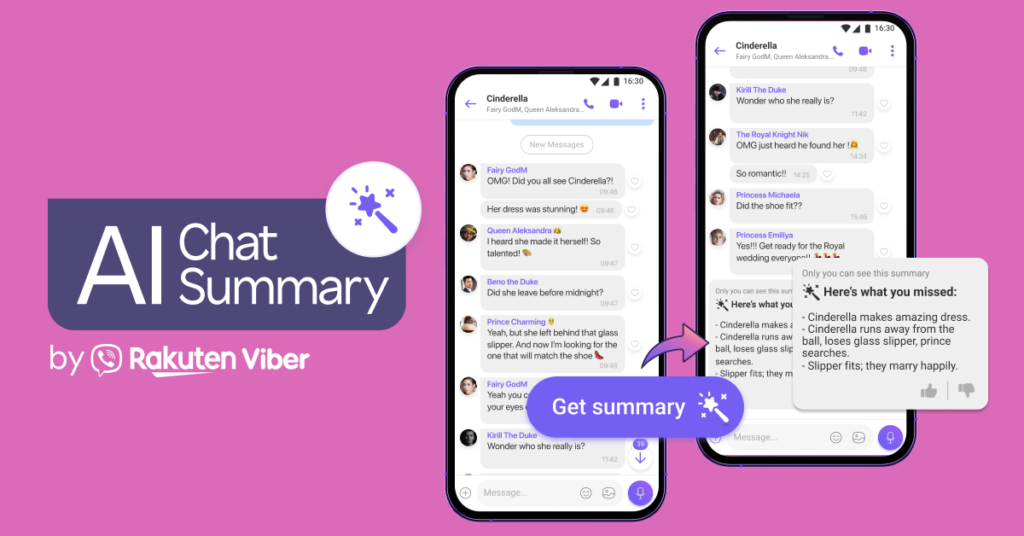
Last week, I was juggling a cross-border project between New York and Tokyo. My inbox was a mess, and my Viber group chats were hitting 500+ unread messages an hour. In the “old days,” I would have spent twenty minutes scrolling just to find out what my boss decided. Instead, I hit the purple “Summarize” button, and in three seconds, I had a bulleted list of action items.
This isn’t just “autocomplete” on steroids. Viber’s 2026 AI suite is designed to solve Cognitive Load. We’re all tired of thinking about how to phrase a sensitive email or a casual rejection. Whether you are using the platform for business or personal fun—perhaps even customizing your experience with animated backgrounds for Viber chats—the AI layer is what makes the app feel truly modern.
Deep Dive: How to Activate and Use AI Polish
The most powerful tool in your Viber arsenal today is AI Polish. Think of it as a professional editor sitting inside your keyboard.
Step-by-Step Execution:
-
Draft Your Messy Thought: Type whatever is on your mind. Don’t worry about typos or being too blunt.
-
Tap the “Sparkle” Icon: To the right of the input field, you’ll see the AI Magic Wand.
-
Choose Your “Vibe”:
-
Professional: Converts “I’m late, sorry” into “Please accept my apologies for the delay; I will be joining the session shortly.”
-
Friendly: Adds warmth and emojis for your social circles.
-
Concise: Strips the fluff—perfect for quick updates.
-
The Insider Secret: I’ve noticed that if you’re using Viber on multiple devices, the AI Polish learning model actually syncs your preferred “Tone of Voice.” If you frequently choose “Professional” on desktop, the mobile app starts suggesting that tone by default.
[Insert Image: Screenshot of the Viber AI Polish menu showing Tone selection | Alt: How to use Viber AI Polish to change message tone in 2026]
Saving Your Sanity with AI Chat Summaries
We’ve all been there: you put your phone down for a movie, and you come back to a “Red Dot” of doom in your work group.
Viber’s AI Chat Summary doesn’t just read the text; it understands the intent. Based on Rakuten’s 2026 Privacy Whitepaper, this processing happens via encrypted temporary tokens, meaning the AI doesn’t “store” your secrets—it just parses them for the summary.
How to trigger it:
-
The Auto-Banner: When unread messages exceed 20, a purple banner appears at the top. Click it.
-
Manual Request: Long-press any message in a busy thread and select “Summarize from here.”
This is particularly useful when you have cross-platform file sync enabled. You can get the summary on your phone while walking to a meeting, and the relevant files mentioned in that summary will be waiting for you on your PC when you arrive.
The Truth About Privacy: Is the AI “Spying”?
As a security-first consultant, this was my first concern. In 2026, data sovereignty is non-negotiable. Viber adheres to the latest IETF end-to-end encryption standards.
Here is the reality: When you use the AI features, the message is decrypted locally on your device, sent to the AI engine via a secure tunnel, processed, and then the “brain” of the AI forgets the interaction immediately. Your chat history remains off-limits to Viber’s employees. If you are a stickler for privacy, you can verify these settings in the Privacy & Security tab on the official Viber website.
Comparison: AI Features at a Glance
| Feature | Best For | Availability |
| AI Polish | Correcting tone/grammar | All 1-on-1 and Group chats |
| Chat Summary | Catching up on busy groups | Groups with 20+ unread messages |
| Link Summary | Previewing long articles | Any shared URL |
| Smart Reply | Quick “Yes/No/Maybe” | 1-on-1 chats |
Your 2026 Viber AI Setup Checklist
Before you start using these tools, make sure your “engine” is tuned correctly:
-
Update to v26.4+: The AI features are server-side but require the 2026 UI components.
-
Enable “Smart Suggestions”: Go to Settings > Calls & Messages > Toggle “AI Suggestions” to ON.
-
Set Your Default Language: Ensure your primary language is set correctly so the AI Polish doesn’t try to translate you into a different dialect.
-
Sync Devices: Ensure your cross-platform sync is active so summaries are consistent across mobile and desktop.
-
Personalize: If you want a more immersive feel, update your animated backgrounds to match your professional or casual “AI tone.”
FAQ: Common Hurdles with Viber AI
Q1: Why don’t I see the AI icon in my chat?
A: This usually happens if your region hasn’t fully rolled out the 2026 update or if you are in a “Secret Chat.” AI features are disabled in Secret Chats to maintain the absolute highest level of zero-trace privacy.
Q2: Does using AI cost extra?
A: For now, Viber offers a generous “Free Tier” for AI Polish and Summaries. However, “Power Users” (those generating over 100 summaries a day) might be prompted to join Viber Plus.
Q3: Can the AI handle slang or industry jargon?
A: Surprisingly, yes. Since it’s built on a modern LLM (Large Language Model) backbone, it understands most tech and medical jargon. However, I’d still recommend a quick 1-second “human proofread” before hitting send on a multi-million dollar contract.
By integrating these AI tools into your daily workflow, you aren’t just “using an app”—you’re leveraging a communication assistant. Whether you’re fine-tuning your Viber desktop experience or just trying to sound more polite in the family group chat, the AI is there to do the heavy lifting. Don’t be afraid to experiment with the different tones; sometimes, a “Funny” AI Polish is exactly what a tense work thread needs to break the ice.