
In today’s digital world, privacy is more important than ever. With billions of messages sent daily through apps like Viber, many users seek ways to ensure sensitive conversations don’t linger indefinitely. Viber’s disappearing messages feature, also known as message expiration timers or self-destructing messages, allows you to set a time limit for messages to automatically delete after being viewed. This adds an extra layer of security, preventing chats from being stored long-term on devices.
Whether you’re sharing confidential information, personal photos, or just want temporary chats, learning how to set message expiration timers in Viber is a game-changer. This guide will walk you through the process step-by-step, explain the benefits, and cover real-world applications. By the end, you’ll be able to use Viber’s self-deleting messages like a pro, enhancing your digital privacy in 2026 and beyond.
What Are Disappearing Messages in Viber?
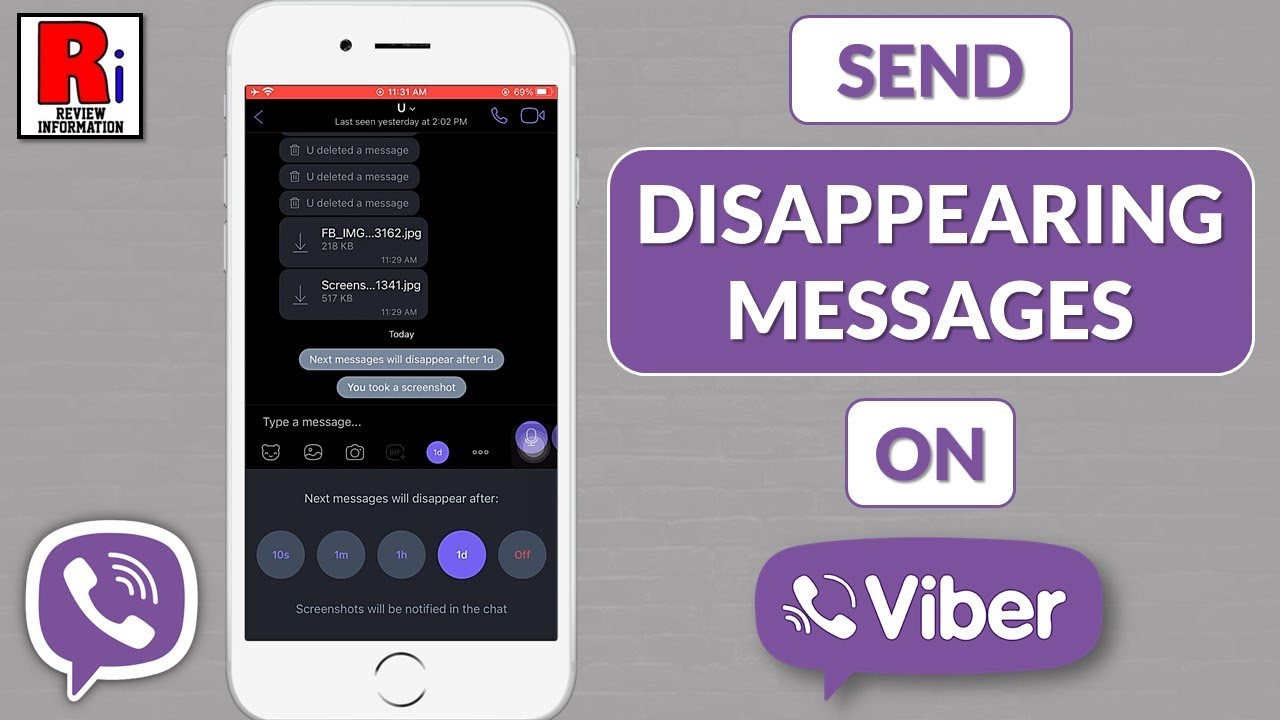
Viber’s disappearing messages feature lets you apply an expiration timer to new messages in a chat. Once set, every subsequent message—text, photos, videos, or stickers—will automatically vanish after the chosen time period from when it’s viewed. Options typically include 10 seconds, 1 minute, 1 hour, or 1 day.
This isn’t just for one-on-one chats; it’s available in group conversations too. The timer applies to all participants, and Viber notifies everyone when it’s enabled or changed. Combined with Viber’s default end-to-end encryption, this makes conversations truly ephemeral.
For more on enhancing your Viber experience, check out our guide on create custom stickers in Viber to add fun, personal touches to your temporary chats.

Step-by-Step Guide: How to Enable Message Expiration Timers on Mobile
Setting up disappearing messages is straightforward on the latest Viber app for Android and iOS. Here’s how:
- Open Viber and navigate to the chat where you want to enable the feature (one-on-one or group).
- Tap the chat name or info at the top of the screen to open chat settings.
- Look for the “Disappearing messages” option (it may appear as a clock icon in some versions).
- Select your preferred timer: 10 seconds, 1 minute, 1 hour, or 1 day.
- Confirm your choice. A notification will appear in the chat informing all participants that disappearing messages are now active.
Once enabled, a timer icon will show next to new messages, counting down from when they’re opened. Media like photos and videos won’t save to galleries automatically, and longer videos can be replayed within the timer limit.
On desktop, the process is similar: Open the chat, click the info panel, and toggle disappearing messages.
If you’re dealing with language barriers in international chats, Viber’s built-in translator for messages can help keep conversations smooth even with temporary content.
How to Set Expiration Timers on Desktop and Other Platforms
Viber syncs across devices, so settings apply universally. On Viber for Desktop or Windows:
- Right-click the chat in your list.
- Select “Chat info.”
- Find and enable “Disappearing messages,” then choose your timer.
Changes sync instantly to mobile. Note that reactions aren’t available in disappearing mode, and notifications show generic previews like “Message” for added privacy.
Benefits of Using Message Expiration Timers in Viber
Why bother with self-destructing messages? Here are key advantages:
- Enhanced Privacy: Sensitive info, like passwords or locations, vanishes without a trace, reducing risks if a device is lost or shared.
- Screenshot Protection: Viber notifies participants if someone screenshots a disappearing message (full blocking on newer Android devices).
- Clutter-Free Chats: Automatic deletion keeps conversations tidy, ideal for temporary discussions.
- Control Over Content: Unlike standard messages, you decide how long info persists.
In real-world scenarios, professionals use this for sharing confidential documents, while friends exchange fun, fleeting media. For instance, send a surprise party location that deletes after 1 hour—no permanent record.
Real-World Applications and Use Cases
Disappearing messages shine in various situations:
- Personal Privacy: Share intimate photos or secrets in relationships without long-term storage.
- Business and Professional Use: Discuss sensitive deals or client info in groups, ensuring details auto-delete.
- Family and Friends: Temporary polls or event plans in group chats.
- Travel and Coordination: Send temporary addresses or codes that expire after use.
As privacy trends evolve in 2026, with increasing data regulations and cyber threats, features like Viber’s expiration timers align with demands for ephemeral communication. Apps are shifting toward user-controlled data retention, and Viber leads with seamless integration.
If your chats are piling up, learn archive chats in Viber to save space—perfect for managing non-temporary conversations.
Latest Trends in Messaging Privacy (2026 Update)
In 2026, privacy-focused features are booming. With rising concerns over data breaches and surveillance, self-destructing messages are standard in top apps. Viber continues to prioritize this, building on its end-to-end encryption. According to privacy experts at the Electronic Frontier Foundation (EFF), tools like disappearing messages empower users against unauthorized access. For deeper insights into secure messaging, visit the EFF’s guide on end-to-end encryption.
Viber’s commitment remains strong—no server storage of delivered messages, and ongoing updates for better protection.
Common Issues and Troubleshooting
Users sometimes face hurdles:
- Feature Not Visible? Update Viber to the latest version via your app store.
- Messages Deleting Unexpectedly? Check if disappearing mode is accidentally enabled—disable it in chat settings.
- Timer Not Applying? Ensure all participants are updated; older versions may not support it fully.
- Media Behavior: Photos/videos don’t auto-save to galleries, but recipients might capture them externally (though screenshots notify).
- Group Chats: Any member can change the timer, notifying everyone.
If issues persist, contact Viber support through the app.
Frequently Asked Questions (FAQs)
- Can I set different timers for individual messages? No, the timer applies to all new messages in the chat once enabled.
- Do disappearing messages work in communities or broadcasts? Primarily for one-on-one and standard groups; check for updates in larger formats.
- Is there a way to recover deleted disappearing messages? No—they’re gone permanently for privacy reasons.
- Does this affect call history or stickers? No, only chat messages.
- Can I enable it by default for all new chats? Yes, in Settings > Privacy > Disappearing messages.
Take Control of Your Viber Privacy Today
Setting message expiration timers in Viber is simple yet powerful, transforming everyday chats into secure, temporary exchanges. Whether for personal security or professional discretion, this feature ensures your conversations stay private and ephemeral.
Download or update Viber now, try enabling disappearing messages in your next chat, and experience peace of mind. In an era where digital privacy matters more than ever, Viber empowers you to communicate freely—without leaving a trace.