
stickers have become an essential way to express emotions, add humor, and personalize conversations. Viber, one of the leading messaging apps with end-to-end encryption and a vibrant community, allows users to go beyond pre-made sticker packs by creating their own custom stickers. Whether you want to turn selfies into funny reactions, capture memorable moments with friends, or design unique expressions for group chats, Viber’s built-in sticker creator makes it simple and fun.
As of late 2025, Viber continues to enhance its sticker features, with billions of stickers sent monthly across its platform. Creating custom stickers in Viber not only boosts engagement in personal chats but also lets you share personalized packs with friends or even make them public in the Sticker Market. This guide will walk you through the process step by step, explore practical applications, advantages, and the latest trends in Viber stickers.
Why Create Custom Stickers in Viber?
Custom stickers offer a level of personalization that standard emojis or GIFs can’t match. They allow you to:
- Capture your unique personality, like turning pet photos into adorable reactions.
- Create inside jokes for family or friend groups.
- Enhance business or community interactions with branded designs.
Viber’s sticker creator is accessible directly in the app on both Android and iOS, requiring no external tools. Packs can include multiple stickers, and you can edit them anytime. For multilingual users, consider exploring use Viber’s built-in translator for messages to make your sticker descriptions accessible worldwide.
Step-by-Step Guide: How to Make Your Own Stickers in Viber
Creating custom stickers in Viber is straightforward and integrated into the app. Here’s a detailed tutorial based on the latest version (as of December 2025):
- Open a Chat and Access the Sticker Menu Launch Viber and open any conversation (or use “My Notes” for testing). Tap the sticker icon (usually a colorful square or smiley next to the text input field).
- Enter the Sticker Creator In the sticker panel, look for the “+” icon or “Create” button at the bottom right. Tap it, then select “Create Stickers” or the pencil/edit icon to start a new pack.
- Name Your Sticker Pack Give your pack a creative name (e.g., “My Funny Faces” or “Family Reactions”). You can add a description and choose a cover image later.
- Add Images to Your Stickers Tap the “+” to select photos:
- Choose from your gallery.
- Take a new photo instantly. Viber recommends clear, high-quality images for best results.
- Edit Each Sticker For each image:
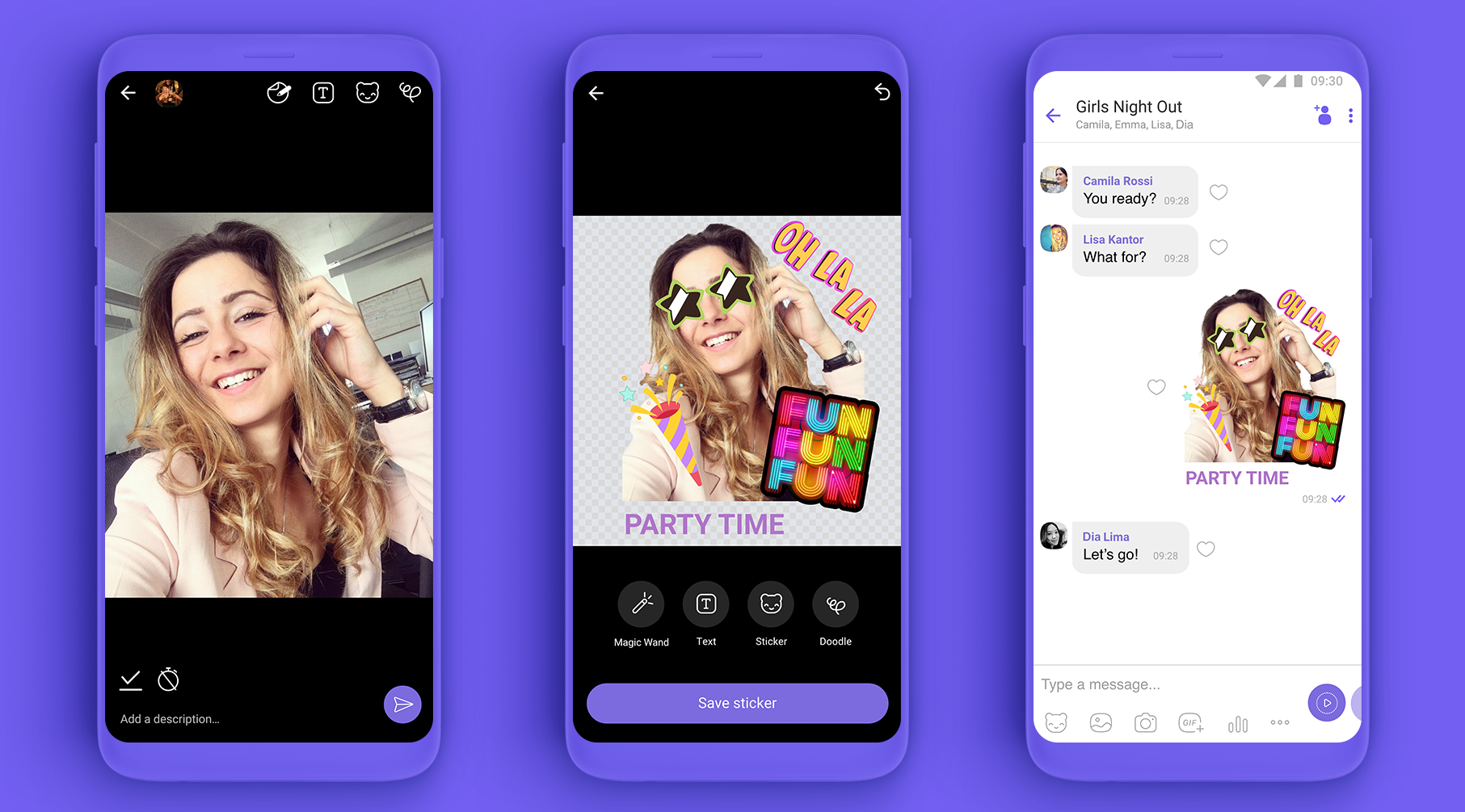
- Use the magic wand tool to automatically remove the background (great for isolating subjects like faces or objects).
- Manually trace or crop for precision.
- Add decorations: doodles, text overlays, emojis, or even other stickers.
- Rotate, zoom, or adjust as needed. Aim for transparent backgrounds to make stickers blend seamlessly in chats.
- Build and Publish Your Pack Add multiple stickers (up to around 30 per pack, depending on updates). Review your creations, then tap “Save” or “Publish.” Choose if the pack is private (only for you) or public (shareable via the Sticker Market).
- Share and Manage Your Pack Send stickers in chats to activate them fully. To share a public pack, generate a link from the Sticker Market.
On desktop Viber, you can upload images but full editing is mobile-only. Packs sync across devices on the same platform.
For organizing busy chats filled with your new stickers, learn archive chats in Viber to save space.
Best Practices and Tips for Designing Great Viber Stickers
To make your custom stickers stand out:
- Image Quality: Use high-resolution photos to avoid pixelation. Viber auto-resizes, but starting sharp yields better results.
- Themes: Create themed packs for holidays, events, or daily emotions (e.g., “Work From Home Reactions”).
- Variety: Mix static expressions with fun poses for versatility.
- Copyright Awareness: Only use images you own or have rights to, as Viber enforces royalty-free policies for custom packs.
Pro tip: Test stickers in group chats for feedback. Viber’s end-to-end encryption ensures your creations stay secure—pair this with features like enable end-to-end encryption for groups in Viber for private sharing.
Real-World Applications of Custom Viber Stickers
Custom stickers shine in various scenarios:
- Personal Use: Immortalize family vacations, pet antics, or couple selfies as reusable reactions.
- Group Chats: Build shared packs for friends, turning inside jokes into quick-send icons.
- Events: Design packs for weddings, birthdays, or team-building with personalized memes.
- Business and Communities: Brands create promotional stickers, while Viber Communities use them for engagement.
In 2025, users increasingly create wellness-themed or eco-friendly sticker packs, reflecting global trends toward mindful communication.
Advantages of Viber’s Custom Sticker Feature
- Ease of Use: No design skills or apps needed—everything is in-app.
- Free and Unlimited: Create as many packs as you want without costs.
- Sharing Options: Private for personal use or public for wider reach.
- Sync and Backup: Packs restore on new devices (same platform).
- Expressive Power: Billions of stickers sent yearly prove their impact on fun, engaging chats.
Compared to other apps, Viber’s magic wand background removal and decoration tools make creation faster and more intuitive.
For inspiration on advanced sticker design, check out Telegram’s official sticker guidelines , which offer similar creative ideas adaptable to Viber.
Latest Trends in Viber Stickers (2025 Update)
As of December 2025, Viber’s sticker ecosystem is evolving:
- More user-generated content in the Sticker Market, with over 10,000 packs available.
- Emerging interactive elements, like stickers integrating with voice notes or AR filters (rolling out in updates).
- AI-assisted suggestions for editing, hinted in recent app versions.
- Collaborations with creators for themed packs, alongside user customs.
With new features like AI link summaries and seamless chat transfers, stickers complement Viber’s focus on smarter, private messaging.
Common Issues and Troubleshooting
- Background Removal Not Perfect? Manually trace edges or use better-lit photos.
- Pack Not Syncing? Ensure you’re on the latest app version and same OS platform.
- Stickers Disappearing? Send them periodically (every 6 months) to keep packs active.
- Public Sharing Issues? Only public packs can be shared widely—adjust settings in the Market.
Update Viber regularly for bug fixes and new tools.
Unleash Your Creativity with Viber Custom Stickers
Creating custom stickers in Viber is more than a feature—it’s a way to make your conversations truly yours. From quick selfies to elaborate themed packs, the process is accessible, fun, and rewarding. In 2025, as messaging apps compete on personalization and privacy, Viber stands out with its robust, user-friendly sticker creator.
Download or update Viber today, dive into the sticker menu, and start crafting. Your chats will never be the same—more expressive, more personal, and infinitely more enjoyable.