
In today’s digital world, messaging apps like Viber have become essential for staying connected with family and friends. With over a billion users worldwide, Viber offers free calls, messages, group chats, and media sharing. However, for parents, ensuring child safety online is a top priority. Many search for “Viber parental controls” or “how to set up family link on Viber” to protect their kids from inappropriate content, strangers, or excessive screen time.
While Viber does not have a dedicated “Family Link” feature like Google’s parental control tool, it provides robust built-in privacy and safety options that parents can use effectively. As of 2026, Viber continues to emphasize user privacy with end-to-end encryption and age-based restrictions. This comprehensive guide will walk you through Viber’s family-oriented features, step-by-step setup for enhanced parental oversight, integration with device-level controls, and best practices for child safety.
Why Parental Controls Matter on Messaging Apps Like Viber
Children and teens increasingly use apps like Viber for school groups, family chats, and social interaction. However, risks such as cyberbullying, exposure to mature content, or contact from unknown users are real concerns. According to online safety experts, messaging apps with strong privacy tools can significantly reduce these risks when configured properly.
Viber’s approach to safety focuses on age restrictions and user-controlled privacy settings rather than a centralized parental dashboard. For users under 16 or 18 (depending on region), certain features are automatically limited. This helps create a safer environment without needing third-party monitoring in many cases. If you’re new to Viber or updating in 2026, start by downloading the latest version from the official source to access the most current security updates: download Viber here.
Key Safety Features in Viber for Families
Viber prioritizes privacy with several tools that indirectly support parental controls:
- End-to-End Encryption: All one-on-one chats, group chats, calls, and media are encrypted by default, meaning only participants can access content.
- Disappearing Messages: Set timers for messages to self-destruct after viewing, reducing the risk of permanent inappropriate shares.
- Hidden Chats: Pin-protected secret chats that don’t appear in the main list.
- Contact Blocking and Privacy Settings: Control who can see your online status, profile photo, or add you to groups.
- Age-Based Restrictions: Accounts for minors have limited access to certain features, like personalized ads or dating services.
For more details on age restrictions, refer to Viber’s official guidelines on age restrictions and teen privacy.
These features make Viber one of the more privacy-focused messaging apps, but active parental involvement is key.
Step-by-Step Guide: Setting Up Viber for Child Safety
Here’s how to configure Viber on your child’s device for maximum protection. These steps are based on the 2026 app version and work on both Android and iOS.
Create or Verify an Age-Appropriate Account
During signup, Viber asks for your date of birth. Be honest—accounts under 13 are not permitted, and those under 16/18 get automatic restrictions:
- No personalized marketing data collection.
- Profile photos visible only to contacts.
- Restricted from adding to groups by non-contacts.
If your child already has an account, check settings under More > Settings > Privacy to confirm age-related limits are active.
Enable Essential Privacy Settings
Open Viber and go to More > Settings > Privacy:
- Disable “Seen” and “Online” status to prevent strangers from tracking activity.
- Turn off “Share ‘Seen’ status” and “Show your photo” for added anonymity.
- Under “Groups & Channels,” restrict who can add the user to groups.
For family communication, create a private family group chat where you can monitor conversations directly.
Activate Disappearing Messages in Key Chats
In any chat:
- Tap the chat name at the top.
- Select “Disappearing messages.”
- Set a timer (e.g., 10 seconds to 7 days).
This is especially useful for teen chats, ensuring sensitive messages don’t linger.
Manage Media and Auto-Downloads
To prevent automatic downloading of potentially inappropriate media:
- Go to More > Settings > Media.
- Disable auto-download for photos, videos, or files over mobile data/Wi-Fi.
Learn more about fine-tuning media settings in this guide on how to enable auto-download for media in Viber—useful when you want controlled access for family shares.
Use Hidden Chats and Screen Lock
For extra security:
- Long-press a chat > “Hide chat” > Set a PIN.
- Enable app screen lock via Settings > Privacy > Screen Lock.
This prevents unauthorized access if the phone is left unattended.
Integrating Viber with Device-Level Parental Controls
Since Viber lacks a native family dashboard, combine it with your device’s built-in tools for comprehensive oversight:
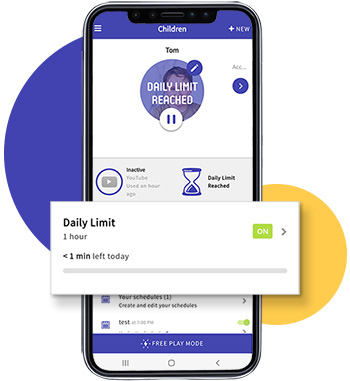
- On Android (Google Family Link): Google’s Family Link allows screen time limits, app blocking, and location tracking. You can set daily limits for Viber or block it during homework hours. Note that some users report workarounds (like accessing via contacts), so combine with Viber’s privacy settings.
- On iOS (Screen Time): Use Apple’s Screen Time to restrict Viber usage, set content filters, and approve downtime exceptions.
- Cross-Platform Tip: Always allow emergency contacts in system controls while limiting recreational use.
In 2026, these integrations remain the most effective way to enforce time limits on Viber.
Advanced Options: Viber Bots and Communities for Positive Use
Viber supports chat bots, which can be educational or fun for kids. Parents can set up or approve bots for homework help, language learning, or family reminders.
Explore how to set up Viber chat bots for personal use to create safe, controlled interactions. Avoid public communities unless moderated, as they can expose users to unfiltered content.
Advantages of Viber’s Approach to Family Safety
- Privacy-First Design: Encryption ensures even Viber can’t access chats, protecting against data breaches.
- Free and Simple: No premium subscription needed for core safety tools.
- Global Reach: Ideal for international families with free calls.
- 2026 Updates: Continued focus on teen privacy guides and restricted features for minors.
Compared to apps with heavy monitoring, Viber encourages open family communication rather than surveillance.
Common Issues and Troubleshooting
- Kids Bypassing Limits: Some bypass device controls via links or contacts—counter with strict privacy settings.
- Unknown Contacts: Regularly review and block suspicious numbers.
- Media Exposure: Disabling auto-download helps, but educate kids on reporting inappropriate content.
- Age Verification: If restrictions don’t apply, contact Viber support to verify account age.
If issues persist, update to the latest version via Viber’s download page.
Latest Trends in Messaging App Safety (2026)
In 2026, trends include AI-powered content moderation and enhanced disappearing features across apps. Viber has expanded its teen privacy guide, offering tips on safe online behavior. Parents increasingly combine app-specific settings with system tools like Google Family Link for layered protection. Experts recommend ongoing conversations about digital safety alongside technical controls.
Empowering Safe Communication on Viber
While Viber doesn’t offer a specific “Family Link” tool, its combination of age restrictions, privacy controls, disappearing messages, and encryption provides strong foundation for parental oversight. By following this guide—setting strict privacy options, using disappearing messages, and integrating with device controls—you can confidently allow your child to use Viber for family and friend connections.
The key to effective parental controls on Viber is proactive setup and open dialogue. Start today by reviewing your family’s accounts and enabling these features. With thoughtful configuration, Viber remains a safe, enjoyable way to stay connected in 2026.