
many users look for ways to consolidate their messaging experience into a single app. Viber, with its rich features like free calls, end-to-end encryption, group chats, and vibrant stickers, is a popular choice for millions worldwide. Naturally, questions arise: Can you set Viber as your default SMS app on Android or iOS? How do you make Viber handle both traditional text messages and its own secure messaging seamlessly?
As of 2026, the short answer is no—Viber cannot be set as the default SMS app. Unlike apps such as Google Messages, Samsung Messages, or Textra that fully integrate with your device’s SMS/MMS system, Viber focuses primarily on its own encrypted messaging protocol and VoIP services. This article will explain why this limitation exists, explore Viber’s strengths as a messaging platform, provide step-by-step guidance on optimizing Viber for daily use, and cover alternatives for managing SMS while keeping Viber as your primary communication tool.
Why Can’t Viber Be Set as the Default SMS App?
To understand the limitation, it’s helpful to know how default SMS apps work, especially on Android.
On Android devices, the default SMS app (sometimes called the “default messaging app” or “SMS handler”) is the one responsible for sending, receiving, and storing traditional carrier-based text messages (SMS/MMS). Google introduced the “default SMS app” role with Android 4.4 KitKat, requiring apps to declare specific capabilities in their manifest and request the ROLE_SMS permission. Only apps that fully support reading, writing, and managing carrier SMS can appear in the default app selection menu.
Viber, while feature-rich, does not implement these system-level SMS permissions. Instead, it prioritizes its own secure, internet-based messaging system. According to Viber’s official features overview (available at Viber Features), the app emphasizes end-to-end encrypted chats, voice and video calls, communities, and multimedia sharing—none of which rely on traditional carrier SMS infrastructure.
This design choice offers significant advantages:
- Superior privacy: All Viber-to-Viber messages are encrypted by default, unlike plain-text SMS.
- Cross-platform consistency: Messages sync seamlessly across phone, tablet, desktop, and web.
- Cost savings: No carrier fees for international messaging or calls to other Viber users.
However, it means Viber won’t appear in Settings > Apps > Default apps > SMS app on Android, and iOS doesn’t allow third-party apps to handle carrier SMS at all.
Benefits of Using Viber as Your Primary Messaging App (Even Without SMS Integration)
Even though Viber can’t replace your carrier SMS app, it excels as a daily driver for most communication needs in 2026. Here are some key advantages:
- End-to-End Encryption by Default Every one-on-one chat, group message, call, and file transfer is fully encrypted. This is a step above traditional SMS, which remains unencrypted on most carriers.
- Rich Multimedia and Expressive Features Viber offers instant voice and video messages, GIFs, stickers, and emoji reactions. In group chats, you can now react to specific messages with custom emojis—a fun way to keep conversations lively. For a deeper dive into the latest emoji reaction options and hidden meanings, check out this 2026 guide to Viber emoji reactions in groups.
- Seamless Multi-Device Experience Viber supports simultaneous use on multiple devices without logging out your phone. You can start a chat on your smartphone and continue on Viber Web or desktop. Learn how to set up reliable multi-device sync with this step-by-step tutorial for Viber Web.
- Battery and Notification Reliability Modern smartphones aggressively manage background apps, which can delay notifications. Tweaking Viber’s battery settings ensures you never miss an important message or call. See practical tips in this guide to optimizing Viber battery settings for instant alerts.
- Communities and Channels Join large communities with unlimited members or follow branded channels for updates—perfect for news, hobbies, or customer support.
How to Optimize Your Messaging Setup with Viber in 2026
While you can’t make Viber your default SMS handler, you can create a smooth dual-app workflow:
Keep a Dedicated SMS App for Carrier Texts
- On Android: Go to Settings > Apps > Default apps > SMS app and choose Google Messages, Samsung Messages, or another RCS-capable app.
- On iOS: The built-in Messages app always handles SMS; no third-party option exists.
Train Your Contacts to Use Viber
- Share your Viber profile link or QR code.
- Encourage friends and family to install Viber for encrypted, feature-rich chats.
Enable Viber Notifications Prominently
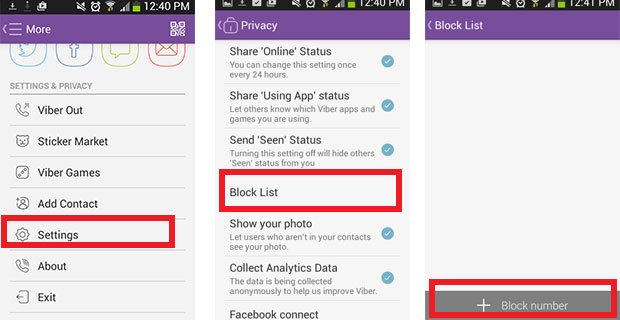
- Open Viber > More > Settings > Notifications.
- Turn on “Use high-priority notifications” and customize sounds/vibrations.
- On Android, go to phone Settings > Apps > Viber > Notifications and allow “Critical alerts” if available.
Use Viber for Outbound Texts to Non-Viber Users
Viber still allows sending messages to regular phone numbers (via Viber Out credits), which appear as standard SMS on the recipient’s side—useful when someone doesn’t have Viber installed.
Common Issues and Troubleshooting
Q: Why doesn’t Viber show up in the default SMS app list? A: Viber does not request the necessary Android system roles for SMS handling. This is intentional to maintain focus on secure, internet-based communication.
Q: Can I receive SMS inside Viber? A: No. Carrier SMS always goes to your default SMS app. Viber only handles its own messages.
Q: Will this change in future updates? A: As of early 2026, there’s no official announcement from Rakuten Viber about adding full SMS integration. The trend in messaging apps is toward RCS (Rich Communication Services) and proprietary encrypted protocols rather than legacy SMS.
Q: My Viber notifications are delayed—what can I do? A: Optimize battery settings as mentioned earlier, disable any battery optimization for Viber, and ensure a stable internet connection.
Q: How do I transfer my Viber chats when switching phones? A: Viber’s built-in backup and seamless transfer feature (introduced in recent updates) makes migration effortless across Android and iOS.
Latest Messaging Trends in 2026 and Where Viber Fits
The messaging landscape continues to evolve rapidly:
- RCS adoption is growing, bringing iMessage-like features to Android’s default apps.
- Privacy-focused apps like Signal and Viber emphasize encryption over carrier integration.
- AI enhancements are appearing—Viber has started rolling out smart replies and message summarization in select regions.
- Business messaging via channels and chatbots is booming, with Viber remaining a strong player in Europe, Asia, and the Middle East.
Viber’s strategy of prioritizing security and rich features over SMS compatibility aligns well with users who value privacy and multimedia expression over traditional texting.
Alternatives If You Need Unified SMS + Internet Messaging
If consolidating everything into one app is essential, consider:
- Google Messages (excellent RCS support)
- Textra or Pulse SMS (customizable third-party SMS apps)
- WhatsApp or Telegram (similar to Viber but with broader global reach)
Many users find the best setup is keeping a lightweight SMS app for carrier texts while using Viber for everything else.
While you cannot directly set Viber as your default SMS app in 2026 due to its focus on secure, internet-based communication, the app remains one of the most capable and enjoyable messaging platforms available. Its end-to-end encryption, multi-device sync, expressive tools, and reliable performance make it ideal for personal and group chats. By optimizing notifications, encouraging contacts to join Viber, and maintaining a separate SMS handler, you can enjoy a near-unified experience without compromising on privacy or features.
If you’re ready to maximize Viber’s potential, start with the linked guides above and explore its latest 2026 updates. Stay connected—securely and expressively—with Viber.